Replacing SPS (Backup Battery) in EMC NS40
The so-called SPS, as far as the author knows, is short for "Switch Power Supply" or "Standby Power Supply." The former (per Baidu Baike) refers to a power supp
The so-called SPS, as far as the author knows, is short for "Switch Power Supply" or "Standby Power Supply." The former (per Baidu Baike) refers to a power supply that uses modern power electronics technology to control the on/off time ratio of the switching transistor and maintain a stable output voltage. The latter, as the name implies, is a "backup battery" or "backup power supply." In this article, its role is that when the device loses power, the data in the cache is written to the hard disk to prevent data loss.
Replacing the SPS:
- Disable the write cache
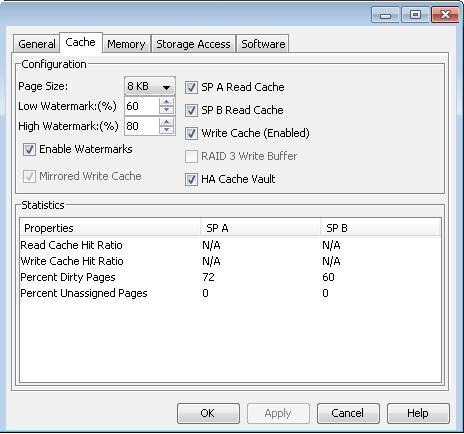
Use the Navisphere software to disable the storage's write cache. Right-click the storage in the software, select "properties," and in the pop-up window choose the "cache" tab. Make sure the Write Cache option is not selected, then click "Apply," as shown in the figure below:
Note: Disabling the storage's "write cache" will negatively affect storage write performance, so it is recommended to perform this operation during periods of low data throughput. If both batteries need replacement, the write cache must be disabled. The process of disabling the write cache may take some time, during which the write-cache status displays "disabling state." Wait until the status changes to "disabled" — the write cache is fully disabled — before proceeding to the next step.
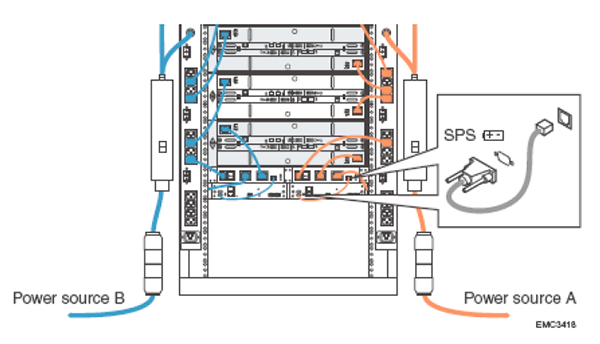
II. Turn off the power switch of the battery to be replaced and unplug all cables. Turn off the switch at the back of the faulty battery (generally indicated by a yellow alarm light) (the power indicator may remain on for up to 90 seconds; wait for the indicator to go out before proceeding). Lift the latch on the power plug and unplug the AC input cable (located with the switch), the AC output cable, and the network interface cable. As shown in the figure below: Warning: Do not unplug any wires from the AC socket. If there is an unused AC socket within reach, plug the two AC output cables (the two jacks next to the network port in the second image) unplugged from the battery to be replaced into that socket. This will ensure that the storage retains power redundancy while the battery is being replaced. (When I actually did the replacement, I simply turned off the switch, unplugged all the cables from the battery, hurried to swap in the new spare part, and the device kept running normally. I did not disable write caching or maintain power redundancy. Some say that when a battery fails, all the data in the cache is fully written to disk, making this step completely unnecessary. But to be safe, following the procedure is still recommended.)
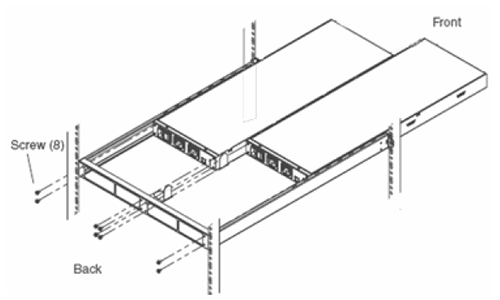
- Remove the screws on the back of the battery.
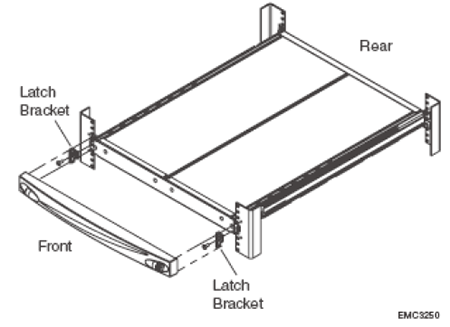
4. Remove the front bezel and the metal plate in front of the battery
The front bezel must be unlocked before being removed. The metal plate in front of the battery has six screws. Usually after unscrewing them, you need to pry it open with a flathead screwdriver to remove it. Then you can pull out the battery and replace it with the new part. Then screw the screws back in, plug in the AC output cable, the AC input cable, and the network cable, press the power switch, and wait for the battery self-check to complete. The battery LED will display green and flash regularly (charging state), and the replacement is complete.
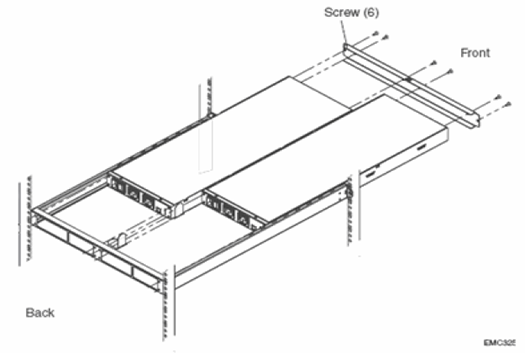
Note: After installing the new battery, once everything is ready, the battery will keep showing a yellow light for several hours or more. This is because the battery is charging. If the yellow light stays on continuously, you can repeat steps 1 and 2, but wait at least 15 minutes before unplugging all cables.
5. Enabling Write Cache
Make sure at least one battery is fully charged (green light steady on); otherwise write cache cannot be enabled.
Use Navisphere software to verify whether write cache is already enabled.
Bash
navicli -h <hostname> getcache
Most of the above is translated from "https://www.emcsps.com/how-to-replace-an-emc-cx3-sps/". If there is any infringement, please let me know.
评论Comments
加载中…Loading…
留下评论Leave a comment