Grafana for GPFS Performance Observability -- DevMon Update
GPFS Cluster Configuration 1\. Install and configure Net-SNMP 1.1 Install the package with yum 1.2 Add Shared Library Links Required by GPFS These files are usu
GPFS Cluster Configuration
1. Install and configure Net-SNMP
1.1 Install the package with yum
yum install -y net-snmp
1.2 Add Shared Library Links Required by GPFS
libnetsnmpagent.so  -- from Net-SNMP
libnetsnmphelpers.so  -- from Net-SNMP
libnetsnmpmibs.so  -- from Net-SNMP
libnetsnmp.so  -- from Net-SNMP
libwrap.so  -- from TCP Wrappers
libcrypto.so  -- from OpenSSL
These files are usually in the directory /lib64 or /usr/lib64 or /usr/local/lib64. Take libnetsnmpmibs.so as an example:
cd /usr/lib64
ln -s libnetsnmpmibs.so.5.1.2 libnetsnmpmibs.so
# the version number could be different depends on your own environment
1.3 Configure the GPFS collection node Net-SNMP server
File: /etc/snmp/snmpd.conf — add the following content:
# Expose all OIDs to external SNMP clients with community name "public"
view all included .1
rocommunity public default

# GPFS SNMPD configuration below
master agentx
AgentXSocket tcp:localhost:705
trap2sink managementhost
managementhost: the host from which GPFS sends SNMP traps. The official docs recommend that if the collected data volume is large, add the following content:
agentXTimeout 60
agentXRetries 10
1.4 Configuring the Collection Node's SNMP Agent
GPFS MIB library
File: /usr/lpp/mmfs/data/GPFS-MIB.txt
1.4.1 Configure MIB Library
Method 1:
Copy or link the file (/usr/lpp/mmfs/data/GPFS-MIB.txt) to the local SNMP MIB directory (usually /usr/share/snmp/mibs).
install -m 0644 /usr/lpp/mmfs/data/GPFS-MIB.txt /usr/share/snmp/mibs
Method 2:
Add the local SNMP Agent configuration (the config file is usually /etc/snmp/snmp.conf).
mibdirs +/usr/lpp/mmfs/data
1.4.2 Configuring the MIB library to be readable
Config file: /etc/snmp/snmp.conf'
mibs +GPFS-MIB
Restart the SNMPD service
systemctl enable snmpd
systemctl restart snmpd
one more thing
- the file
/etc/snmp/snmp.confis the configuration for SNMP Agent - the file
/etc/snmp/snmpd.confis the configuration for SNMP Daemon - All the actions be taken in the above section is ONLY for Agent
- The host which need to read the GPFS OID(s) should specify the MIB too. Which means:
- Copying or linking the MIB file to local MIB directory, or add configuration for the SNMP agent
- Adding configuration
mibs ...to the local SNMP agent, or read OID(s) value(s) with-m GPFS-MIBoption followed - If all the above two steps can not be done, you can still read the values with
-m /path/to/GPFS-MIB.txtoption followed withsnmpwalkor other commands
GPFS Collection Node Management
Supported Operations
- Activate collection node
- Fail collection node
- Change collecting node
Activate the Collection Node and Start the SNMP Sub-service
mmchnode --snmp-agent -N NodeName
Disable the collection node and stop the SNMP sub-service
mmchnode --nosnmp-agent -N NodeName
Check SNMP Agent Configuration
mmlscluster | grep snmp
Changing the SNMP Collection Node
mmchnode --nosnmp-agent -N OldNodeName
mmchnode --snmp-agent -N NewNodeName
Starting and Stopping the GPFS SNMP Subsystem
- The SNMP subsystem starts and stops automatically;
- The SNMP subsystem starts and stops together with the GPFS cluster;
- When activating an SNMP collection node, if the GPFS cluster is already running, the SNMP subsystem will start automatically;
- When a collection node fails, the SNMP subsystem on that node will also stop automatically.
Official Links
DevMon SNMP Entry Configuration
YAML File Example[^1]
[^1]: The SNMP read timeout can be increased slightly to avoid the GPFS SNMP subsystem not responding (untested on high-config servers, or it may be ignored.)
---
# device address which runs SNMP agent
address: GPFS_Collector_Node_Address  # the address which been listened to by SNMP Daemon
region: SomeRegion  # The region of device, e.g., DCA, DCB, DataCenterA...
area: SomeArea  # the business area
addr_in_cmdb: SomeAddr  # the address which related with Resource ID in CMDB
rid: 'THis is resource ID'
snmp:
  version: '2c'  # the SNMPD version
  community: 'public'  # the SNMPD community
  mib: 'GPFS-MIB'
  timeout: 2  # second(s) to timeout, increase the value in case of reading faulty with busy OS
  retries: 1  # time(s) to retry after failed
  OIDs:
  # the information of GPFS cluster
  - id: 'gpfsClusterName'
    label: gpfsClusterName
    explanation: 'GPFS cluster name'
    show: True  # add support for group showing
  - id: 'gpfsClusterId'
    label: gpfsClusterId
    explanation: 'GPFS cluster ID'
    show: True
  - id: 'gpfsClusterMinReleaseLevel'
    label: gpfsClusterMinReleaseLevel
    explanation: ''
    show: True
  - id: 'gpfsClusterNumNodes'
    label: 'gpfsClusterNumNodes'
    explanation: ''
    show: True
  - id: 'gpfsClusterNumFileSystems'
    label: 'gpfsClusterNumFileSystems'
    explanation: ''
    show: True

  - group:
      - gpfsDiskPerfName
      - gpfsDiskPerfFSName
      - gpfsDiskPerfStgPoolName
    label: gpfsStorgePoolName
    show: True

  - group:
      - gpfsDiskReadTimeL
      - gpfsDiskReadTimeH
      - gpfsDiskWriteTimeL
      - gpfsDiskWriteTimeH
      - gpfsDiskLongestReadTimeL
      - gpfsDiskLongestReadTimeH
      - gpfsDiskLongestWriteTimeL
      - gpfsDiskLongestWriteTimeH
      - gpfsDiskShortestReadTimeL
      - gpfsDiskShortestReadTimeH
      - gpfsDiskShortestWriteTimeL
      - gpfsDiskShortestWriteTimeH
    label: gpfsPerfTime
    perf: True

  - group:
      - gpfsDiskReadBytesL
      - gpfsPerfBytes
      - gpfsDiskReadBytesH
      - gpfsDiskWriteBytesL
      - gpfsDiskWriteBytesH
      - gpfsDiskReadOps
      - gpfsDiskWriteOps
    label: gpfsPerfOps
    perf: True

  - group:
      - gpfsFileSystemPerfName
      - gpfsFileSystemBytesReadL
      - gpfsFileSystemBytesReadH
      - gpfsFileSystemBytesCacheL
      - gpfsFileSystemBytesCacheH
      - gpfsFileSystemBytesWrittenL
      - gpfsFileSystemBytesWrittenH
    label: gpfsFsSystemBytes
    perf: True

  - group:
      - gpfsFileSystemReads
      - gpfsFileSystemCaches
      - gpfsFileSystemWrites
    label: gpfsFsIO
    perf: True

  - group:
      - gpfsFileSystemOpenCalls
      - gpfsFileSystemCloseCalls
      - gpfsFileSystemReadCalls
      - gpfsFileSystemWriteCalls
      - gpfsFileSystemReaddirCalls
    label: gpfsFSSysCalls
    perf: True

  - group:
      - gpfsFileSystemInodesWritten
      - gpfsFileSystemInodesRead
      - gpfsFileSystemInodesDeleted
      - gpfsFileSystemInodesCreated
    label: gpfsFSInodeIO
    perf: True

  - group:
      - gpfsFileSystemStatCacheHit
      - gpfsFileSystemStatCacheMiss
    label: gpfsFSCacheNo
    perf: True
DevMon Continuously Reads GPFS Performance Data
/path/to/venv/python3 devmon.py perf -s
# Default sampling interval is 60s
InfluxDB Installation and Configuration (Gentoo as an example)
1. Add package keywords
cat >> /etc/portage/package.accept_keywords << EOF
dev-db/influx-cli ~amd64
dev-db/influxdb ~amd64
EOF
2. Installing Packages
emerge -avt influxdb influx-cli
3. Reconfigure the InfluxDB service[^2] (the bundled service file has a startup issue; the influxd command has no -config option; the service is not adapted.)
File: /etc/init.d/influxdb
-- # command_args="-config ${config} ${influxd_opts}"
++ export INFLUXDB_CONFIG_PATH="/etc/influxdb/influxdb.conf"
++ command_args="run ${influxd_opts}"
4. Adding Configuration
File: /etc/influxdb/influxdb.conf influxdb.conf on GitHub
5. Activate and Start the Service
rc-update add influxdb default
/etc/init.d/influxdb start
Install Grafana locally[^3] (the package keyword also needs to be added; same as above;)
emerge -avt grafana-bin
Grafana Configuration Dashboard
Examples
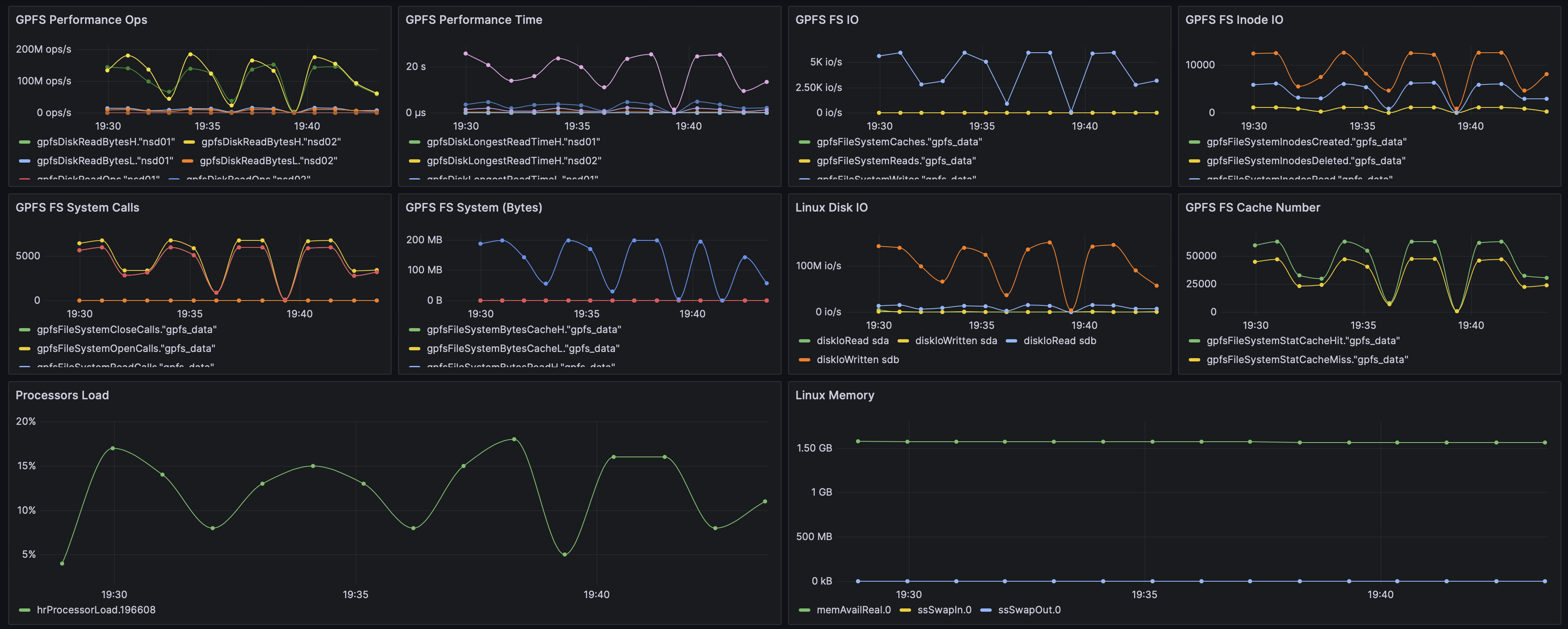
JSON Template
GPFS Performance Observability Json Model
评论Comments
加载中…Loading…
留下评论Leave a comment