Using the PDCA Model to Track Down the Process Stealing Traffic on macOS
Preface Recently, the office environment didn't have wireless, so I had to make do with a mobile hotspot. I didn't expect that in just 2 days, I'd burned throug
Preface
Recently, the office environment didn't have wireless, so I had to make do with a mobile hotspot. I didn't expect that in just 2 days, I'd burned through the 20G in my original data plan. I originally thought the web pages on the computer platform were richer in content, and that some ads and preloaded videos consumed most of the data.
But when the newly purchased 3-day 10G data pack was exhausted again, I finally couldn't help but give in to my curiosity as a poor man. Since I was already in this mess, I figured I should at least find out who dug the pit. So I thought about opening the Activity Monitor to see if there was a suspect, so I could splash some blood on them to satisfy my hatred.
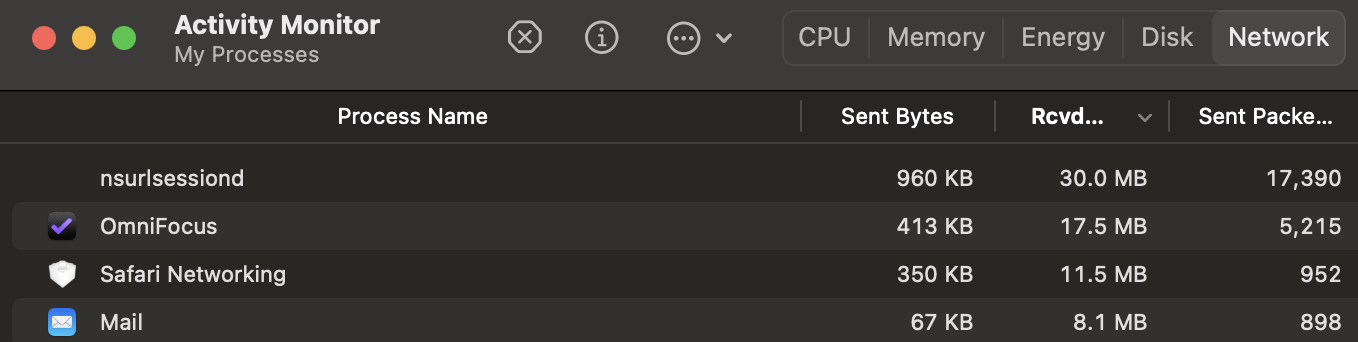
Hey, what a coincidence — the moment I reached out, I caught a malicious process, "nsurlsessiond," which visibly sent 20M of packets in under a minute.
Fortunately, as spring deepens, I haven't let my hands grow idle either. I learned a set of internal cultivation methods called PDCA, which is just the thing for catching the sneaky little thief who stole the package.
Table of Contents
- Overview
- About the PDCA Model
- PDCA Loop 2
- Summary
- Postscript
Overview
Apply the PDCA management model in practice to shut down the macOS background-traffic leaker—both the way and the technique.
About the PDCA Model
Keywords
- Management methodology
- Continuous improvement
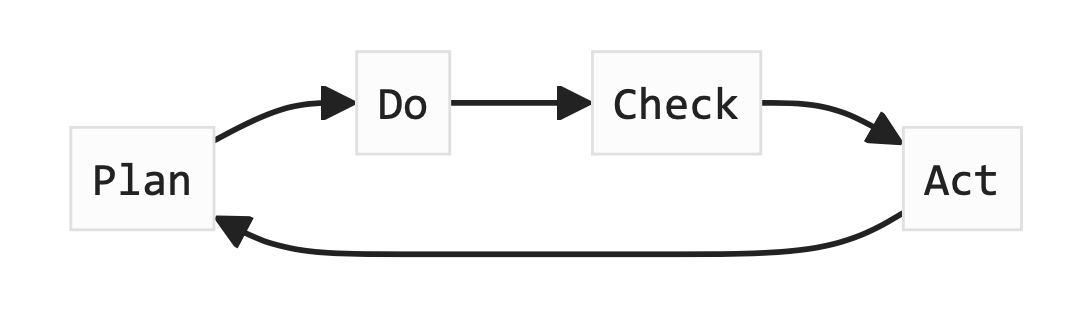
- Four phases
- Plan
- Do
- Check
- Act
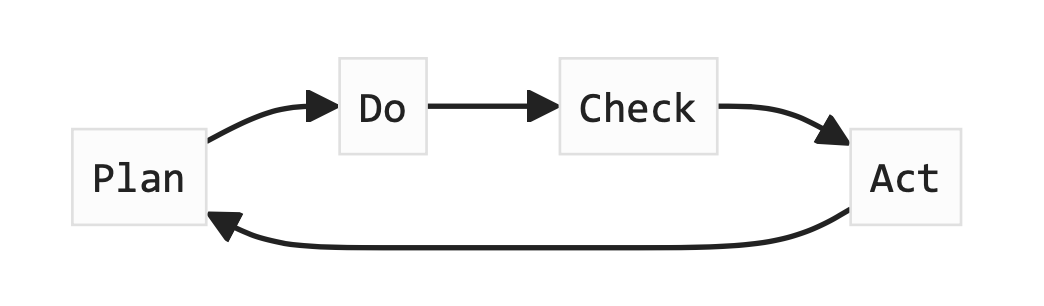
Purpose
Aimed at helping organizations and individuals continuously improve their business, processes, and products through a cyclical process.
Let's dig deeper
Plan
Form an initial plan, and break it down into concrete actionable steps.
Available models (GPT's suggestions)
SMART Goals:
- SMART goals are goals that are Specific, Measurable, Achievable, Relevant, and Time-bound. Setting SMART goals ensures that objectives are clear and well-defined, helping to improve the feasibility of execution.
SWOT Analysis:
- SWOT analysis is a method for evaluating an organization or project's Strengths, Weaknesses, Opportunities, and Threats. Through SWOT analysis, key factors in the internal and external environment can be identified, helping to determine priorities and directions for improvement.
5W1H Analysis:
- 5W1H analysis involves answering a series of questions: Who, What, When, Why, How, and Where. This analytical method helps to fully understand the essence of a problem and the factors that influence it.
Fishbone Diagram (Ishikawa Diagram):
- The fishbone diagram is a problem-analysis tool, also known as a cause-and-effect diagram or Ishikawa diagram. It breaks a problem down into different factors, including people, methods, machines, materials, environment, and measurement, helping to identify root causes and develop solutions.
PDCA Form:
- The PDCA form is a tool for recording the PDCA cycle, used to track the activities and results of the Plan, Do, Check, and Act phases. It helps organize and monitor the progress and effectiveness of improvement projects.
This article plans around the first methodology that GPT gave: SMART goals.
Conclusions After the Plan (Node 1)
Key Goal 1 ^ec32ea
Within half an hour (time-bound) after the computer connects to the phone's hotspot, use the monitoring tool built into the operating system (specific) to roughly view which process (relevant) sends the most network packets (achievable) at the minute granularity (measurable).
Key Step 1|[[#^d524f0]]
Do · Execute
Principles to Reference During Execution (GPT)
In the execution phase of the PDCA model, there are no specific rigid principles, but there are some key guidelines and practices that help ensure smooth execution and lay a solid foundation for the subsequent Check and Act phases. Here are some principle-level guidelines:
Clear communication and responsibility assignment:
- In the execution phase, ensure smooth communication among team members, with everyone clear about their responsibilities and roles. Clearly designate the executor of each task, ensuring all understand the requirements and deadlines.
Effective resource management:
- Ensure the necessary resources (including human, material, financial, etc.) are fully allocated and utilized. This includes reasonable scheduling of time, budget, equipment, and technical support to facilitate smooth project or task execution.
Continuous monitoring and tracking:
- During execution, regularly monitor the progress and performance of the project or task. This can be done through milestones, tracking key performance indicators, regular meetings, etc., to ensure the plan is executed on time and to quality.
Flexible response and problem solving:
- Various problems and challenges may arise during execution. The team needs the ability to respond flexibly, solve problems promptly, and ensure the plan runs smoothly. This includes identifying issues, developing response strategies, and adjusting the plan.
Continuous improvement and learning:
- During execution, the team should constantly seek opportunities for improvement and learning, try new methods and technologies, to enhance work efficiency and quality. This can be achieved through experience summaries, knowledge sharing, training, etc.
Documentation and feedback:
- Record key information and results from the execution phase and provide timely feedback. This helps the team and management understand project progress and issues, and make timely adjustments and decisions.
These principles and guidelines help ensure that the execution phase of the PDCA model runs smoothly, that the project or task is implemented as planned, and lay the groundwork for the subsequent check and act phases.
Execution and record (node 2)
Key Step 1 ^d524f0
In the monitor, I found the key target process consuming data: 'nsurlsessiond'.
Hypothesis Killing the process will put a stop to the runaway traffic.
Verify A few minutes later the process will restart automatically and start sending large amounts of network packets again.
Check·Review
Principles or Methods in the Check Phase (GPT)
- Collect data and information:
- During the Check phase, the team gathers data and information about the implementation phase, which may include task progress, project performance metrics, client feedback, and so on.
- Analyze execution results:
- The team analyzes the data and information collected, comparing actual results against expected goals to determine how effective the execution phase was.
- Evaluate the process and outcomes:
- The Check phase focuses on evaluating both the execution process and the results of the project or task, to ensure they meet the expected goals and requirements. This may involve reviewing project documents, analyzing key performance indicators, evaluating client satisfaction, and so on.
- Identify problems and opportunities:
- In the Check phase, the team identifies any problems or improvement opportunities that arose during execution. This includes identifying deviations, identifying root causes, and determining the severity of issues.
- Develop improvement plans:
- Based on the Check phase's evaluation, the team develops concrete improvement plans to correct problems, improve processes, or boost performance. This may include adjusting workflows, providing additional training, improving communication mechanisms, and so on.
- Continuous improvement:
- The Check phase is a continuous-improvement process; it involves not only evaluating the current project, but also improving the PDCA cycle itself. The team should look for opportunities for ongoing improvement to enhance work efficiency and quality.
Inspect and Evaluate Key Step 1 (Node 3)
Key Step 1|[[#^d524f0]]
- Analyze execution results
- Killing it triggers a process restart, presumably the process has a background-resident service
- Improvement plan
- Find the service behind the process 'nsurlsessiond' and limit data usage by stopping that service.
Correction Goal 1 ^b00580
- View the macOS command
launchctlto list services and their start/stop operation parameters - Identify the background service backing the
nsurlsessiondprocess ^3d11e7 - Temporarily stop (stop but keep enable) the service in step 1 ^3d11e7
- Check whether the process still exists in
Activity Monitor
Act·Action
Discussion on the Difference Between Do and Act (GPT)
In the PDCA model, both the DO phase and the ACT phase involve actual execution and action, but they differ somewhat in purpose and timing.
- DO phase (Execution phase):
- The DO phase refers to the specific actions and tasks outlined in the plan. In this phase, the team puts the planned solutions into practice, executing the work according to the predetermined schedule and procedures. The DO phase focuses on the concrete implementation of the plan, including resource allocation, task assignment, and execution.
- ACT phase (Action phase):
- The ACT phase refers to taking appropriate action based on the results of the CHECK phase to correct problems, improve processes, or achieve optimization. In this phase, the team, based on the inspection and evaluation results of the CHECK phase, determines the specific actions that need to be taken, and implements those actions to improve the current state.
In short, the DO phase focuses on the actual execution of the plan, while the ACT phase focuses on taking action based on the assessment from the CHECK phase. DO is the execution process of the plan, and ACT is the response and adjustment based on the CHECK phase results. In the PDCA cycle, DO and ACT are tightly linked, together forming the cycle of continuous improvement.
Key points
- Do is the actual execution of the Plan
- Act is the response to the Check results
- Check is somewhat like a review, while Act feels more like a finishing strike
Re-execution After Review
Fix Step 1 ^927b60
Find the background service
$ launchctl
...
list            Lists information about services.
start           Starts the specified service.
stop            Stops the specified service if it is running.
...

$ launchctl list | grep nsurlsessiond
-    0    com.apple.nsurlsessiond
Stop the background service
$ launchctl stop com.apple.nsurlsessiondCheck service status
# No error when stopping the service, but checking the status shows there are two parallel services
$ launchctl print com.apple.nsurlsessiond | grep -E "^\tstate"
Unrecognized target specifier, did you mean
system/com.apple.nsurlsessiond_privileged
gui/501/com.apple.nsurlsessiond

Usage: launchctl print <domain-target> | <service-target>
<service-target> takes a form of <domain-target>/<service-id>.
Please refer to `man launchctl` for explanation of the <domain-target> specifiers.
First check the PID of the user-level service
$ launchctl print gui/501/com.apple.nsurlsessiond | grep pid
pid = 30158
Check the PID of the
nsurlsessiondprocessThe process ID
30158can also be seen from macOSActivity Monitor![[Activity_Monitor_PID.png]]Confirm the correspondence between the
nsurlsessiondprocess and thegui/501/com.apple.nsurlsessiondserviceCheck the monitor; the process has disappeared
First-Round PDCA Results
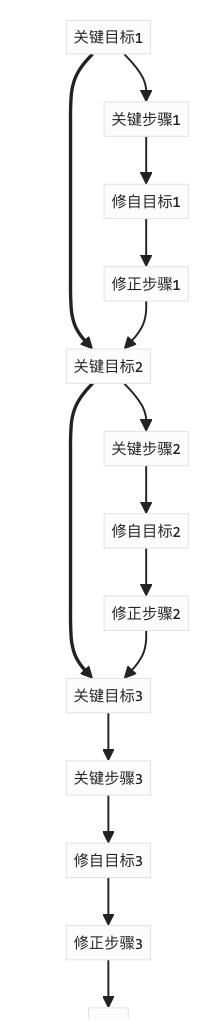
- P - Form hypotheses based on observations and craft a plan: Key Objective 1[[#^ec32ea]]
- D - Execute Key Objective 1, with the process documented as: Key Step 1[[#^d524f0]]
- C - Review and assess the outcome of Step 1; after revision, derive: Revised Objective 1[[#^b00580]]
- A - Verify the revised steps: Revised Step 1[[#^927b60]]
PDCA Overall Cycle Structure
Stage Conclusion
- Affected process:
nsurlsessiond - There are two corresponding services:
- User level:
gui/501/com.apple.nsurlsessiond - System level:
system/com.apple.nsurlsessiond_privileged
- User level:
- After stopping the corresponding service with
launchctl stop com.apple.nsurlsessiond, the process disappears.
However
After a while, the process still comes back to life!!!!
PDCA Cycle 2
Assuming the process is controlled by the system-level service, that is, system/com.apple.nsurlsessiond_privileged, then stopping only the user-space service will indeed only kill the process for a short time.
Key Goal 2
Stop the service system/com.apple.nsurlsessiond_privileged as the super user, and use the print parameter of launchctl together with grep to continuously check the service's status, while also monitoring the persistence of the process.
Key Step 2
$ sudo launchctl stop system/com.apple.nsurlsessiond_privileged
Password:
$ launchctl print system/com.apple.nsurlsessiond_privileged | grep state
state = running
job state = running
Revised Goal 2
Considering that the process has a short shutdown window after launchctl stop com.apple.nsurlsessiond stops the service, as a workaround, the script uses a while loop to check whether the process exists or the service is running, and automatically executes launchctl stop if so.
Correction step 2
#!/bin/bash

while true; do
  if launchctl print gui/501/com.apple.nsurlsessiond | grep -E "^\tstate" | grep not >/dev/null 2>&1; then
    echo $(date "+%Y%m%d %H:%M:%S")
    echo 'nsurlsessiond is not running.'

    launchctl print gui/501/com.apple.nsurlsessiond | grep state | sed 's/\t//g'
    ps -ef | grep nsurlsessiond | grep -v grep

  else
    echo $(date "+%Y%m%d %H:%M:%S")
    echo 'nsurlsessiond is running.'

    launchctl stop com.apple.nsurlsessiond
    launchctl stop system/com.apple.nsurlsessiond_privileged
    launchctl stop gui/501/com.apple.nsurlsessiond
    echo 'service stopped'
  fi

  echo '-----'
  echo
  sleep 3
done
As expected, the end of every ops career is scripts 😭😭
Summary
Guided by the PDCA model, this article attempts a textbook case of "using a sledgehammer to crack a nut" and "an anti-aircraft gun to shoot a mosquito." The techniques and ways of solving problems are always dazzling and have no inherent ranking. As a successful exercise-style attempt, the point is not to achieve any qualitative breakthrough in daily life or work, nor does it aspire to make a name with just a few words. The key is to experience a kind of pleasure — finding self-realization in the small details, or positive feedback, or closed-loop motivation. It is all about achieving mental focus, and inevitably, within the shackles, keeping company with birds and beasts, fighting a battle in a cornered situation.
Postscript
In fact, the most effective way to defeat the enemy is to fight them with their own weapon against their own shield. Apple macOS's own power-saving feature can pause iCloud's background sync when not connected to external power.
Therefore, the no-code alternative is: unplug the power.
评论Comments
加载中…Loading…
留下评论Leave a comment